
Common Questions in Analytics Interviews - Part 1
Analytics is a pretty vast field!
An analyst is not only expected to have good technical knowledge, but also needs to understand the business/product context.
In today's market, the title "Data Analyst" is used so leniently, that the responsibilities of a Data Analyst in CompanyA can be completely different than that in CompanyB. This makes the the job descriptions very confusing, due to varied skill requirements.
So, what are the core skills expected from an Analytics professional and what can a person expect in an Analytics interview?

This article is Part 1 of Common Questions in Analytics Interviews - series. This series aims to list down some questions which are commonly asked during analytics interviews, along with some examples.
(Note: This is not at all an exhaustive list of questions. It is just a sample of what type of questions can be expected)
SQL Knowledge
SQL is to a Data Analyst, what a knife is to a chef - without it once cannot operate in their respective fields. This is one of the most critical skills for any analyst, and so, naturally a significant weightage is given to whether a candidate possesses relevant SQL knowledge.
Following are some of the common SQL questions.
Execution Order of SQL clauses
What is the order of execution for each clause in the following SQL query?
SELECT
	user_id,
	category_name,
	SUM(revenue) as total_revenue
FROM table_1
JOIN table_2 on table_1.product_id = table_2.product_id
where date = '2025-01-01'
group by user_id, category_name
having total_revenue > 0
FROM / JOIN
This is the first clause to run. It fetches all the tables and joins to create a master merged table
WHERE
This clause filters out the relevant rows in the master merged table. It is important to apply proper conditions to improve query performance
GROUP BY
Then, the dataset is separated into groups which need to be present into summary. All the aggregations happen in these groups
(user_id and category_name in the above example where the revenue is summed up for every user x category combination)
HAVING
This is used for further filtering based on aggregate columns.
(aggregate columns like total_revenue cannot be called in WHERE clause. The having statement drops all the rows which has total_revenue = 0)
SELECT
This clause has the final columns which are to be included in the result.
Knowing the basic order in which these clauses run helps analysts write efficient production-ready queries.
SQL Syntax
Consider the following tables as samples and answer the following questions
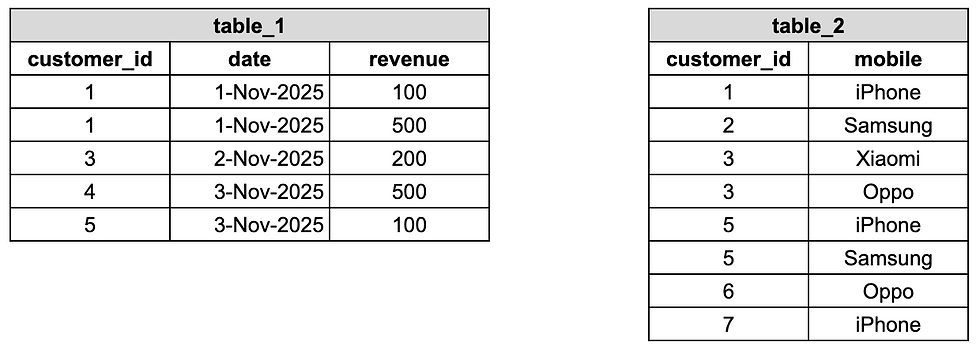
Write a query to get Total Revenue for 1-Nov
select
	sum(revenue) as total_revenue
from table_1
where date = '1-Nov-2025'
Find out the error in the following SQL queries
select
   customer_id,
   sum(revenue) as total_revenue
from table_1
Error:
group by customer_id is required as there is an aggregation present
select
   customer_id,
   mobile,
   sum(revenue) as total_revenue
from table_1
left join table_2
on table_1.customer_id = table_2.customer_id
group by 1,2
Error:
customer_id is ambigious
Since customer_id field is present in both table_1 and table_2, we need to specify from which table we need to fetch customer_id in the select clause
select table_1.customer_id
Understanding of Joins in SQL
Considering the above sample, what is the resultant table after
Left Join
Inner Join
LEFT JOIN
Includes all the rows of join key from the Left Table and ONLY the Common rows between tables from the right table.

mobile for customer_id = 4 is absent as it is not present in table_2
Since, customer_id = 3 has 2 rows in table_2, 2 rows are created in the resultant table. (Same with customer_id = 5)
INNER JOIN
Includes only the common rows of join key from both the tables

customer_id = 2 and 4 are absent as they are not common
Multiple rows are created based on the number of rows present for each join key in both tables.
Common Table Expressions (CTE) and Window Functions
Find the mobile with the highest revenue on 1-Nov-2025
with base as
(
	select
		mobile,
		sum(total_revenue) as revenue
	from table_1
	left join table_2 on table_1.customer_id = table_2.customer_id
	where date = '1-Nov-2025'
	group by mobile
),

rnk as
(
	select
		mobile,
		revenue,
		rank() over (order by revenue desc) as revenue_rnk
	from base
)

select
	mobile,
	revenue
from rnk
where revenue_rnk = 1
The with clause allows us to create intermediate views within the query. It helps us break down our login into multiple steps and makes the query more readable. These are called Common Table Expressions (CTE)
In the above query, base is a CTE created with the output of the query inside.
Then, using base, another CTE rnk is created.
The final expected output is created using rnk as the base data
The following statement creates a column with a rank, with highest revenue having rank = 1
rank() over (order by revenue desc) as revenue_rnkorder by revenue desc specifies that assign a rank to the row based on revenue column in a descending order
Find the cumulative revenue for every customer_id till date
select
	customer_id,
	date,
	revenue,
	sum(revenue) over (partition by customer_id order by date rows between unbounded preceding and current row) as cumul_revenue_till_date
from table_1
The final column in select clause is
sum(revenue) over (partition by customer_id order by date rows between unbounded preceding and current row) as cumul_revenue_till_datesum(revenue) specifies to sum the revenue column
partition by customer_id sums up the revenue separately for each customer.
order by date specifies to order the table in an ascending order of dates before aggregation
rows between unbounded preceding and current row specifies to sum all the rows since the start till the current date, when ordered based on the order by clause.
In short, following steps are carries out in the calculations
Breaks down the table into chunks for each customer_id
Orders each chunk in an ascending order of date
Sums up revenue from the starting date till the date of the row
Repeats this calculation for each date present in the date column
And that's it!
These was the Part 1 of Common Questions in Analytics Interviews series. some of the questions which may be asked in interviews. No need to get intimidated as some of the later questions are slightly difficult, and might not be asked in entry-level interviews.
But knowing these concepts will definitely fetch you some brownie points. (If not that, alteast help you with the things you can learn in SQL)
Stay tuned for next parts!


Comments